Feature news

Showing posts with label Tips And Tricks. Show all posts

Function Emblem In Mobile Legends

 Makclep.com - Maybe some of you do not know about the emblem function in Mobile legends. Therefore, I will discuss about emblems according to my understanding. If anything is less forgiven please.

Function Emblem In Mobile Legends

 Emblem is a very important element in Mobile legends game. Each emblem represents the various roles and styles of play that exist in this MOBA game. Maybe in the beginning you play Mobile Legends do not think about emblems. That's reasonable because at the initial level the perceived difference is not significant, but when the level rises and your rank also rises, then the usefulness of this embelm is felt. Players should be able to choose a suitable emblem for their hero. There are many emblems to choose from. Each embelm has different statistics, therefore, your game style must also be balanced with the emblem. So what are the functions of every emblem in the Mobile legends game?

1. Physical Emblem Set
This emblem is suitable for heroes with outstanding physical attack attributes. Heroes that require high physical damage and require additional armor should use this emblem. Suitable Hero using Physical Emblem Set is Yun Zhao, Alpha, Alucard, Sun and several other heroes. I myself often use this emblem.

2. Magic Emblem Set
Function Emblem In Mobile Legends

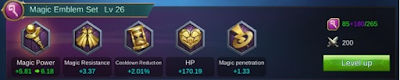
From the name of course you already know. This emblem is suitable for mage like Aurora, Nana, Estes and others. If you often use Mage in battle then do not forget to select this emblem and upgrade Magic Emblem Set to maximum level.

3. Tank Emblem Set
Function Emblem In Mobile Legends

For those of you who like to wear Tank heroes like Tigreal, Gatotkaca, Akai and other tank heroes, then I recommend to use this emblem. This is very useful for immunity, especially if it is maximal level.

4. Jungle Emblem Set
Function Emblem In Mobile Legends

This emblem is very coock for you who are often kill minster to get the buff or benefit from the monster who was killed. Killing monsters is also very important, especially for hero assassin, marksman, and fighter. Balance this emblem with Retribution ability.

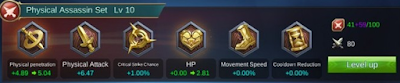
5. Physical Assassin Set
Function Emblem In Mobile Legends

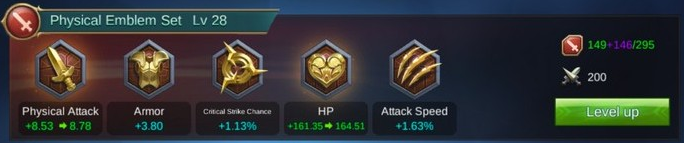
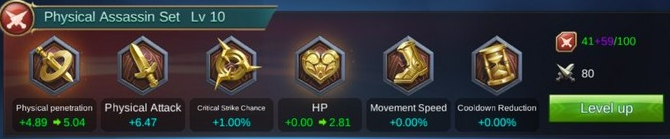
Likes to be a dangerous killer in Mobile Legends games? Use this set to increase your assassins ability. Physical Assassin Set is suitable for heroes Karina, Saber, Hayabusa, Natalia and Fanny.

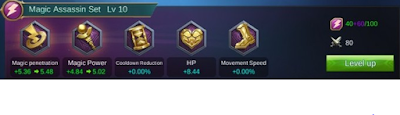
6. Magic Assassin Set
Function Emblem In Mobile Legends

Similar to Physical Assassin Set, but its main attribute is magic. Emblem set is good for Mage hero with nuke skill that has high damage like Eudora, Aurora, Gord, Kagura, and Alice. However, it feels like this emblem set is made to accommodate Karina, the only herass assassin with magic attributes. With this set of emblems, you will have a more powerful magic attack. But HP you have also become thinner!

7. Fighter Emblem Set
Function Emblem In Mobile Legends

Emblem for you guys fight. Become more powerful and awesome. This emblem excels at HP and Magic Resistance. I rarely use this emblem.

8. Roamer Emblem Set
Function Emblem In Mobile Legends

This emblem is suitable for you who love to move lane to do enemy gank. All the attributes here allow you to inflict enormous damage to the enemy, run away, and do it again in a short time. Hero-heroes with massive burst damage are perfect here, such as hero assassin and mage.
Learn more »

Tips And Tricks To Not Noob in PES 2017 Mobile

Tips And Tricks To Not Noob in PES 2017 Mobile

 Makclep.com - Hopefully tips and tricks to not noob in PES 2017 Mobile is useful for you players PES 2017. I'm sure if not a few android users who play this game. Although you guys often play Pro Evolution Soccer on PC or console but some of these tips will add insight because it's a little different.

 PES 2017 is a soccer game that requires the ability to manage strategy, understand the situation and good at managing the ball. PES 2017 android became one of the games that have been waiting for so far. Maybe you are one of those people.

Here are some tips and tricks PES 2017 Mobile:

1. Choose Appropriate Controls

Control feature is an important element in a game, therefore the developer provides photore control according to the needs of players. Players can manage the controls that have been provided in the control settings menu. The cursor can be set between manual and automatic. If you choose automatically, then players will pass and receive the ball automatically which allows you to control the game. With automatic settings you do not need to be so focused that you can not do other things like talking to friends, eating or something else.

2. Follow the Event
Tips And Tricks To Not Noob in PES 2017 Mobile

When there is an Event organized by PES 2017 Mobile, we join the event. You will get attractive prizes, in addition to playing experience is also increased so that your skills increase. Events that exist in this game is very helpful to the players.

3. Player Data
Tips And Tricks To Not Noob in PES 2017 Mobile

If you do not know how to view players data, you can check on pesdb.net. The average player stats PES 2017 Mobile is the same as the PC version. Every player in the 2017 PES game has a different level limit. The level limit is differentiated by some agents. At the Scout level, the maximum level is 30. At the Normal Agent level, the maximum level is 50. And at the Best of 2016 level, the max level is 60. So even though we both have Neymar Jr players, it could have got me stronger than you because different agent levels. You can also limit the break on the player to increase their agent level.

4. Re-Roll Technique

Re-Roll techniques or re-gacha are often used by many people in every game. At PES 2017 Mobile, every new player will get 4 times the chance to do free gacha. In the gacha you have the opportunity to get a black card containing top class players, with a certain probability. You can continue doing Re-Roll by doing clear data on your phone. There is no limit when doing Re-Roll, so maybe you can get the desired player but you have to have a high patience.

5. Basic Tips
Tips And Tricks To Not Noob in PES 2017 Mobile

 These tips are done when the match lasts. To snatch the ball from your opponent, click and hold on the right-hand screen. To feed the ball, wipe the screen to a teammate. To run while dribbling, click and hold the right-hand screen then navigate as you please. To perform shooting, click on the screen on the right as much as 2 times.

 That's a little tips on playing PES 2017 Mobile games. Hopefully these tips and tricks useful for you readers. Thank you and so much.
Learn more »

Guide Item Alucard Mobile Legends, Hard to Die

Guide Item Alucard Mobile Legends, Hard to Die

 Makclep.com - I will share the Alucard Mobile Legends Item Guide, Difficult Dead to you Mobile Legends players. Alucard is a great hero fighter if you can play it and know its ability. Maybe not banya who use this hero due to heroes at close range, in contrast to Karie who is a long distance hero but has a good skill. Many Mobile Legends players who use Karie but Karie can not be used in Epic ranked.

 Alucard is suitable for solo battles but also very helpful when fighting together as long as you do not advance first, better forward after the tank. For details about this Alucard hero, you can see the picture below.

Guide Item Alucard Mobile Legends, Hard to Die

Guide Item Alucard Mobile Legends, Hard to Die

 That's the specification of the Alucard hero. Pretty good with skill that can not be underestimated. Alright for Alucard Item Guide is:

1. Endless Battle
2. Warrior Boots
3. Haas's Claws
4. Demon Hunter Sword
5. Immortality
6. Blade of Despair

 It is a Lifesteal item that is able to add HP when the opponent attacks. If HP, you do not have to bother recall but you can attack the forest monsters or minions then HP will return high (recover).

 If the fight lasts for a long time and the coins earned are numerous, then use 2x Blade of Despair. That's great for improving your attacks.

Guide Item Alucard Mobile Legends, Hard to Die

 That's Alucard Mobile Legends Item Guide, Hard to Die. I say it's hard to die because HP is not easily reduced and can add continuously when fighting. That's the item I use in my Alucard hero.

 So that you can MVP and became Pro player in playing Mobile Legends game, you read my article titled Smart Tips on Playing Mobile Legends.
Learn more »

Smart Tips on Playing Mobile Legends

 Makclep.com - Now a lot of people are playing Mobile Legends, therefore I share the smart tips on play Mobile Legends so you guys rode from noob to pro. The tips I'm about to share may seem simple.

 There are lots of Mobile Legends tips and tricks you can learn from experience, suggestions from other players and articles. Hopefully the tips here help you and increase your insight.

1. Train Hero

 Use the hero that works best for you or your most favorite hero. Use the hero to be proficient or often play the hero. With the hero you play, then you can know elemahan and greatness hero and his prowess you can maximize and minimize weaknesses.

2. Patience

 The key to playing smart is to be patient. You should be able to withstand lust killing especially early in the game. Usually the player is too confident against other players without seeing the greatness of the enemy, the environment and others. Do not because your heroes are close but you can win a long-distance hero.

3. Near the Tower


 Play near the tower especially at the beginning. Low level is a very risky level to die. Do not get too advanced especially if you fight Franco. Be patient until the time comes. 4. Keep the Tower Jafa tower should not be destroyed. Try to keep your tower even though your opponent is more than 1. Opponent will not dare to fight tower if there is no minion.

5. Teamwork
Smart Tips on Playing Mobile Legends

 Smart Tips Playing Mobile Legends is the most important teamwork. This is absolute and inviolable because you are here to play the five not alone. Free play an important strategy to support each other, for example there is interest and no one stole an enemy tower or attacked with tanks in the front position.

6. Signal

 Use a good signal. If the ping gets too high then it will cause the game to be interrupted and it will hurt both you and the team.

7. An appropriate item or gear

 Buy items according to hero. Read the description of the item and use it for your hero. Suppose you use a career, then the item is a match item attack speed, physical attack and other items. Do not use Karie but use many HP items.

8. Emblem

 Do not forget to upgrade your emblem periodically especially the emblem you used to use. Use the Emblem that you think matches your hero.

9. Skin

 Skin is also very influential on the game. Many pro games that always use the skin because it is very helpful. They are willing to buy diamonds for their favorite heroes.

10. The right position

 You must be good at placing the hero's position when the war is together. Tanks are in front, followed by fighter and remote users are behind them. Do not use long distance too close to enemy.

11. Leveling

 Focus Focus up the level early in the game. Try to level up quickly early in the game by killing minions and monsters. Levels are very influential in combat as there are many improvements to your hero.

12. On move

 When you actively move to kill the minion, the enemy or the monster then the money you get more and more and purchase items can be done quickly. If your item is so early then you can surpass other players.

13. Do not come forward

 You can not lure forward because there can be a trap or ambush. Look at the situation.

14. Note the Map

 Do not ignore the folder. View the map to find out the situation as well as the presence of friends and foes. If you see a lot of heroes coming to you, then you can just step aside.

15. The right abilities
 Choose the abilities that match the hero. For example Zilong using Fury ability, it is very influential armpit fight.

Read also Fastest Download Manager App For Android.
Learn more »

Can not Download From The Play Store, It's The Solution

 Makclep.com - A simple way to get around this non-downloadable Playstore is for people who have trouble downloading something on Google Playstore via android smartphone. If you do not have problems downloading then this way you can learn or share to the needy.

 Not being able to download games, apps or anything else on Google Playstore is very inconvenient. It is caused by several factors. Here I will share a way to morbent Playstore that is eror or less than maximum. If downloading but only slowly it's just your internet connection only. But if it can not download, it's new problem is quite serious though handling is very easy and fast.

Let's just go straight to the practical and simple way to overcome Playstore that can not download.

1. Internet Connection
Can not Download From The Play Store, It's The Solution

 Make sure your quota or internet access is still running well. If you do not have adequate internet access then of course there will be disruption when you download games or apps on Playstore.

2. Data Restrictions
Can not Download From The Play Store, It's The Solution

 Make sure data restrictions are not exceeded. If data usage is restricted please increase the restriction by going to Settings Menu -> Data Usage.

3. Clear Data
Can not Download From The Play Store, It's The Solution

 The purpose of deleting data here is to delete existing data in the Playstore app. The trick is Go to Settings menu ==> Applications ==> Select Playtore ==> Clear Data (cache). This is the most powerful way to deal with Playstore that can not download if both ways above can not handle it.

 That's 3 easy ways for playtsore to download normally so that owners can be free to download whatever they want on Playstore. That is all and thank you.
Learn more »

Tips Android 7.0 Nougat And The Secret

Tips Android 7.0 Nougat And The Secret

 Makclep.com - Tips Android 7.0 Nougat And The Secret. Android is an OS for the most widely used mobile phones. Mobile phones that use this OS commonly called android smartphone. Good features and affordable prices make this smartphone selling in the market. The middle to lower class can have android smartphone with a relatively cheap price.

 Because a lot of who like the android, then Google continues to develop this OS, and currently Google has released OS Android 7.0 or called Nougat. Of course many who do not understand the advantages of android 7.0 Nougat this. I will share some of the tips of Android 7.0 Nougat and its secret that has not been known by many people.

1. Multi-Window
Tips Android 7.0 Nougat And The Secret


 If you already have a smartphone Android 7.0 Nougat, the first thing you should try is a multi-window feature. You can open two applications simultaneously, the screen is divided into two. how to use this feature is quite easy, just simply press Recent App and select the app then drag up the screen. Remember, you must be open first.

2. Direct Reply

 This feature lets you reply to messages directly from the notification bar. You can directly reply to a message without having to enter the application. Feature is very useful because when you open application or you are playing the game then you do not need to get out of the application or game.

3. Block Notifications Quickly
Tips Android 7.0 Nougat And The Secret

 The third Android 7.0 Nougat tip is managing know-how. You can manage various types of certain types of notifications based on the apps in your smrtphone. For example notifications from social media apps, games and more. How to use the feature is to push the old notification in, then there will be several options and you can block or prioritize the notification.

4. Data Saver
Tips Android 7.0 Nougat And The Secret

 One of the advanced features in Android 7.0 Nougat is the Data Saver feature. This feature allows you to save data and save battery. The trick is to open the Settings menu -> Data usage -> Data saver -> enable. You can manage any important applications like BBM, WhatsApp and more.

5. Change the DPI

 Android Nougat introduces new options that you can use to control the DPI settings so that the size of icons and posts you can set as you wish. These new features can be found in the Display Settings menu, in the Display Size option. Please choose the appropriate size.

Read Also : Best Android Games

6. Volume Button Camera
Tips Android 7.0 Nougat And The Secret

 Nougat android users can reprogram the volume buttons to control more for the camera phone application functionality. Going to your camera's Camera settings menu, you can choose to set the volume button to take a picture, or zoom function. You can still disable the feature, and everything will work normally.
Learn more »